
Author Archive for mikeguthrie

Nagios Performance Tuning – Tech Tips: Understanding Disk I\O

We often get questions about the kind of hardware requirements needed for a particular Nagios installation.  As covered in a previous article, this is often a very difficult question to answer since monitoring environments differ so much.  Most people assume that for a large Nagios installation, it’s a matter of simply adding enough CPU’s to the machine to handle the workload that it’s given.  Although having enough CPU power is important, I’ve found that it’s ultimately not the biggest hardware limitation to the system.  A large Nagios installation creates an enormous amount of disk activity, and if the hard disk can’t keep up with the constant traffic flow that needs to happen, all of those precious CPU’s are simply going to wait in line to be able to do what they need to do on the system.  I’ve talked to some users who have spent some serious money on hardware to have insanely fast disks to handle their workload, but I wanted to do some experiments in-house for those users who may need to have better performance on a budget.  I want to give special thanks to Nagios community members Dan Wittenberg and Max Schubert for documenting some of the tricks that you guys pioneered on this topic.

Continue reading ‘Nagios Performance Tuning – Tech Tips: Understanding Disk I\O’

Nagios XI Operations Center Component

nocscreen1

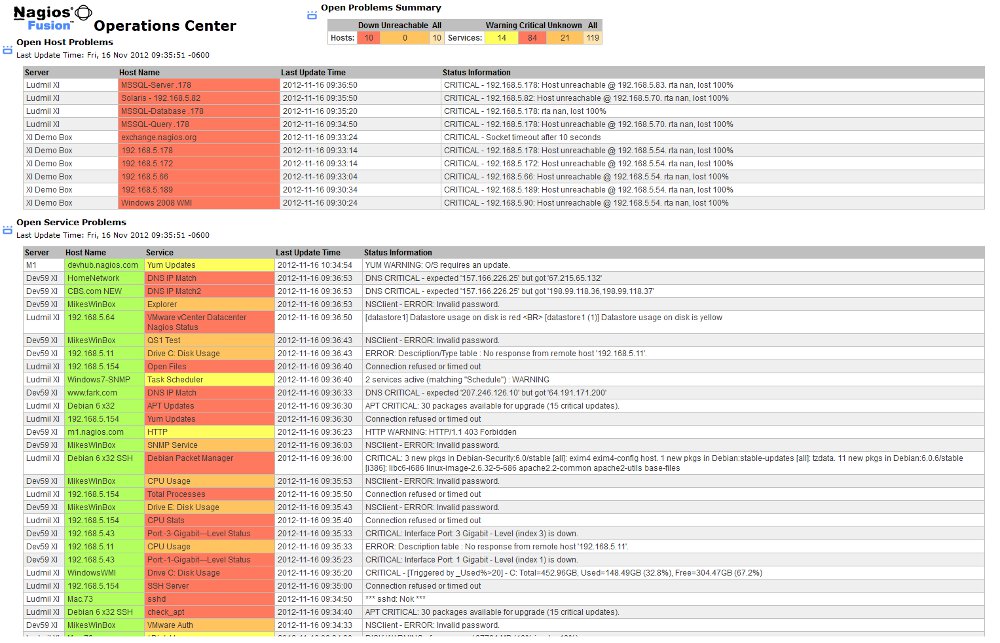
The new Nagios XI Operations Center Component provides a NOC screen-style view of all unhandled host and service problems. The screen automatically refreshes every 30 seconds to show the latest problem events.  This is one of two NOC-style screens recently created, along with the Nagios XI Operations Screen Component.  Users can pick a NOC screen to suit their visual tastes that will keep a close eye on the latest problems in their environment.

Download Nagios XI Operations Center Component


XI System Profile Component

The component adds a System Profile page to the Admin menu and displays relevant system information for common troubleshooting issues.  The profile information can be downloaded as a text file to provide support teams with importation information. This component will ship with any Nagios XI install 2011R1.10 or newer.  We recommend installing this component for all existing 2011 installs in order to expedite support issue.

Download System Profile Component

Nagios Mobile 1.0

nagiosmobile1

Nagios Mobile is a lightweight web interface, based on the Teeny Nagios project by Hirose Masaaki. Nagios Mobile is a PHP web-based application designed for Mobile and touch-screen devices.

Key Features:
- User-level authorization for hosts, services, and commands that match Nagios Core.
- Filtered lists to quickly identify and respond to unhandled problems
- Acknowledge problems, Disable/Enable Notifications, or Schedule Downtime for authorized hosts and services
- Works with any Nagios 3.x installation
- Support for APC data caching for faster page loads
- Support for both webkit and non-webkit enabled devices

My favorite kinds of development projects always end up being on the front-end, and I certainly can’t claim much on the interface design for this project, as that goes to community member Hirose Masaaki using the JQuery Mobile framework.  We loved the front-end design that he came up with for the Teeny Nagios project, so we did some revisions to the server-side code underneath to allow for host and service filtering by state, more complex permissions, data caching, and improved scalability for larger installations.    We also added some code to allow Nagios Mobile to work from essentially any mobile browser.

Download Nagios Mobile.


Nagios BPI v2.0 Beta

One of the most challenging, but also rewarding projects that I’ve worked on so far during my time at Nagios is the Nagios Business Process Intelligence (BPI) project.  Nagios BPI was created as a way to visualize business process health by grouping hosts and services together, and creating rules to discern the true health of the network infrastructure as it relates to the business. An admin can define rules for each BPI group, and monitor the health of the group’s state based on what has been defined.  Version 1.x of BPI got a lot of positive feedback from users, and quite a few feature requests.  However, as time went on it became clear that in order for BPI to be more suitable for enterprise environments, more advanced permissions needed to be implemented, as well as several other usability issues resolved.  I’ve spent the last 6 weeks or so doing some seriously overhauling to the code in order to support a lot of the new features I wanted to add to a new version of BPI.  I’m excited about the changes in this new version, and I also really think that this is an add-on to Nagios that can really do some good in a lot of monitoring environments.  I think the future of monitoring is going to highlight the idea of monitoring within the context of the business, and this project allows users to turn host and service monitoring into actual business process monitoring.  Currently this project is in a beta stage and only works with Nagios XI, and we plan to implement this as a feature of our 2012 release.  A community version of Core will follow sometime later in 2012, but the intention is to pilot a lot of these new features in the XI environment, and later the code can be adapted to allow for use with Core installs as well.     Here’s a highlight of the new features in BPI v2.0

  • AJAX based updates keep the data fresh without ever having to refresh the page
  • BPI Groups can be automatically generated and synced with existing hostgroups and servicegroups, and rules can be set for determining their group states.
  • Improved permissions scheme.  Only Admin-level users can add, modify, or delete groups.  All other users can be added as “read-only” users for each group, which allows for use of BPI in multi-tenancy installs of XI.
  • Groups can now be sorted by problem “weight,” which allows for quicker identification of problems within the business process.
  • Group state calculations now use health percentages instead of problem counts in determining group states.
  • Group state calculations can account for “handled” problems in the logic, as defined as a config option.
  • More informational feedback for the check plugin so a user knows “why” a group is in a problem state.
  • Created an XML cache/API for reduced CPU usage for BPI checks, and also to allow external applications to access the data.

See the updated documentation for BPI v2 here.

The code for this new version has not yet been released. Feel free to contact me if you’re interested in beta testing before the 2012 release of Nagios XI.  Here are a few screenshots from the new version.


Nagios XI Benchmarking Experiments

A question our sales team often gets from potentials customers is: “How many hosts/services can I monitor with a single Nagios XI license?”  As much as we’d like to be able to give people a concrete answer to the question, it ultimately comes down to either “We don’t know,” or “That depends on….”.  So as a side project, I decided to attempt my second benchmark test with Nagios XI, and see how hard we can push the software, having learned a few things since my first test almost a year ago.  Most of my findings from that first test were outlined in the document Maximizing Nagios XI Performance.  Since writing this, we’ve learned a few tricks from both Core and XI users that have been done in larger environments, and we’ve also played with a few ideas we’d never tried before.  So here’s the rundown on what we’re using for a test machine, the tweaks I tried, and the results I found.  Special thanks to Nagios Community members Daniel Wittenberg, Jeff Sly, Nate Broderick, and Max Schubert for your large installation tips.

Nagios XI Server (An older physical desktop we converted to a test machine).

  • Intel Dual Core CPU 3gz
  • 2gb of RAM
  • 140gb HD, probably 7200 RPM
  • Offloaded MySQL to a VM with 1gb of RAM, and a single CPU
  • 823 Hosts, 3379 Services.  All active checks running on a 5mn check interval.
  • 4200 checks in 5mn
  • 14 checks per second on average
  • All active checks are being executed from the XI server, mostly running PING, HTTP, DNS To IP, and DNS Resolution


The Results:

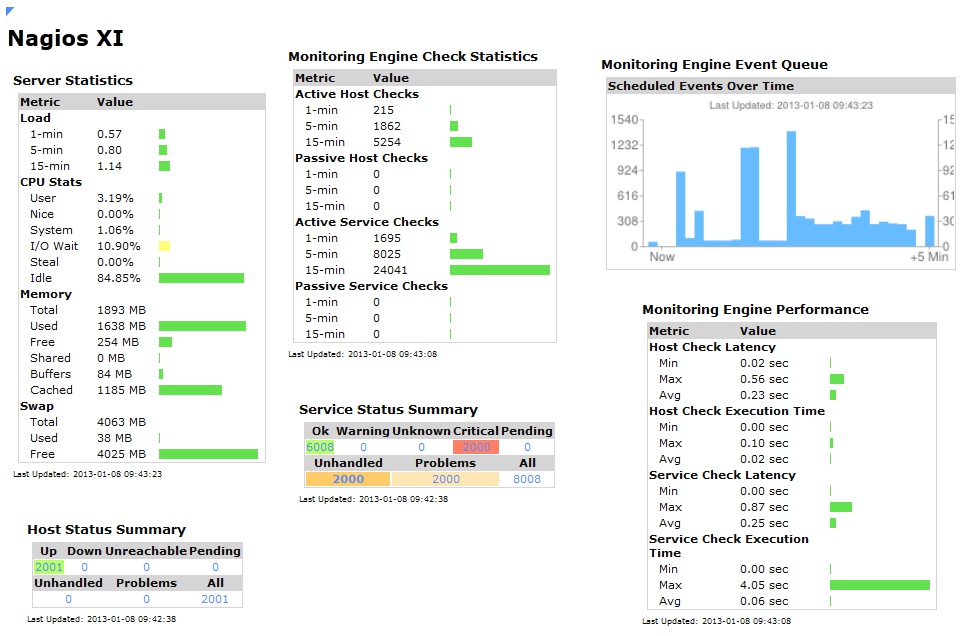
The CPU load generally hovers around a comfortable 1.75 to 2.5, and the real page load times for the XI interface range from about 1-7 seconds, depending on the page.  Below is a list of tweaks that I found actually made a noticeable impact on the server’s performance

  • #1 effect on peformance by far, offloading MySQL to a second server.  This cut the CPU load to less than half.
  • Utilizing a RAM Disk for status.dat, objects.cache, host-perfdata, and service-perfdata to reduce disk I/O
  • Using rrdcached to reduce disk writes from performance data
  • Avoid use of active SNMP, and check_esx3.pl checks as much as possible
  • Used the following settings for MySQL caching, as recommended by Jeff Sly, added to /etc/my.cnf:
  • ##experimental DB tweaks
    tmp_table_size=524288000
    max_heap_table_size=524288000
    table_cache=768
    set-variable=max_connections=100
    wait_timeout=7800
    query_cache_size=12582912
    query_cache_limit=80000
    thread_cache_size=4
    join_buffer_size=128k
  • Added the following hourly cron job:
  • #!/bin/sh
    ntpdate pool.ntp.org
    /sbin/service httpd restart
    /sbin/service postgresql restart
    psql nagiosxi nagiosxi -c "vacuum;"
    psql nagiosxi nagiosxi -c "vacuum analyze;"
    psql nagiosxi nagiosxi -c "vacuum full;"
  • I also did some experimental tweaks to the nagios init script to enable faster startup options.  However, I don’t recommend this for production environments unless you know how to manage a custom init script, and my shell scripting is still sketchy enough that I had some problems with multiple nagios instances being spawned because of this.  But the reason I enabled this is that I wanted Nagios to restart itself once per hour to level off the check schedule, since I noticed that after a while the checks get scheduled unevenly, causing CPU spikes at some times, and valleys at others.
  • In the Admin->Performance Settings page, I changed the “Dashlet Refresh Multiplier” to 2000, used all unified dashlet options, and set all of the DB tables to delete information that would be older than 2 weeks.  I found that keeping the database tables trimmed tightly kept everything running faster.  I did increase the refresh date of the dashlets that gave performance information for the XI server so that I could see all of the server statistics in a fairly up-to-date manner.
  • I also spent a LOT of time staring at filtered results from “top” ; )

The next stage of our benchmark testing will be to offload the checks themselves to slave machines using either DNX or Mod Gearman to distribute the check load.  We’re also going to upgrade our benchmark box once more, so my hope is to to able to load a single XI instance to 20-30k checks every 5 minutes, but I’m sure we’ll discover our share of new complications and bottlenecks as we continue to scale XI to a larger install.  We’ll keep you posted on what you find!  If you have suggestions for further tweaking an XI install, post a comment because we’d love to hear them!

Nagios V-Shell 1.8 Release

Over the past few years, there’s been a strong outpouring of requests for an updated interface for Nagios.  We released Nagios V-Shell just about a year ago now, and we’re happy to see that it currently stands as the most popular item on the Nagios Exchange, with over 100,000 views!  I don’t usually post to labs every time I make an update to V-Shell, but I thought this time around would be worth mentioning.  I’ve spent the last few weeks doing a major overhaul of the permissions in order to mirror the same permissions scheme that people are used to in Nagios Core.  Initially V-Shell has limited user-level control in regards to permissions, but as of v1.8 I’m pleased to say I’ve finally got that major TODO crossed off my list.  V-Shell now supports user-level access, as well as read-only access to match the permissions scheme of Nagios Core.  Feel free to check out V-Shell 1.8 on the Nagios Exchange.

Mass Check Rescheduling

We had a cool meeting last week with one of our users, and he gave us some great suggestions for tweaks and improvements.  One of his ideas was adding the ability to “schedule immediate checks” in bulk, so that once problems are fixed, admins can quickly cross hosts and services off the list of problems.  As our user said, “I’m not so much interested in what is working as I am what’s not working.”  Since the logic and filtering was already in place with the Mass Acknowledgment Component, I decided to simply add “schedule immediate check” to the list of options with this component.  Thanks user TL for the suggestion!  As developers, we love feedback, and usually our best ideas come from users, so keep the ideas coming! : )

Mass Acknowledgment Component v1.1


Action URL Component

We’ve had a few users request the use of the “action_ur”l and” notes_url” config options to be accessible from the XI details screen.  Nothing terribly fancy with this component, just another option for those users who need it.  As Nagios developers, we love feedback, and we love to know what you guys need from our software, so keep the suggestions coming!


Nagios CCM Early Beta

With a project that started last December by translating comments from German, I’m relieved to see this project reach a stage where I feel comfortable showing the public.  Nagios CCM (Core Config Manager) is a forked revision of the project NagiosQL 3.0 by Martin Willisegger. The code underneath dramatically overhauls the front-end logic, strives to improve X-browser compatibility, and ultimately paves the way for easier maintenance and improvements down the road.  The database structure and underlying classes remain the same as the NagiosQL project, but the front-end has been entirely rebuilt, and the client side interactions are rewritten in JQuery in hopes to make community developments easier.  Currently the Nagios CCM Beta only works on an XI install, but we’re hoping to release a community version that will work on Core installs later this year.  New features in the Nagios CCM include:

  • The ability to test host and service checks directly from the web interface
  • Plugin documentation can be viewed from the web interface
  • Search filters built into every page
  • Improved pagination
  • Group relationships can be see from both group->object and object->group directions.
  • Improved user feedback from the database and it’s relationships

Although the Nagios CCM is far from finished, we wanted to give users a chance to check things out and get a feel for where this project will be headed.

If you’re a Nagios XI user, and you want to test out the CCM on your test environment, you can install the latest revision of the CCM with the following instructions.

Install Instructions:
cd /tmp
wget http://assets.nagios.com/downloads/exchange/nagiosccm/CCM.tar.gz
tar zxf CCM.tar.gz
./install-CCM.sh

Access the new CCM Beta from the Nagios XI->Configure->Nagios CCM BETA (link).